It’s been another warm 21 degrees here in Notts today.
And according to the weather app, it’s going to stay warm for the next couple of weeks.
(We’ll see how long that lasts, lol.)
Today’s email is just a quick one…
For the past couple of days I’ve been working on creating some new bonuses for my current upsell I have.
All with the help of ChatGPT to outline them.
Here’s one of the prompts that ChatGPT created:
“Write a short-form tip for beginners who want to grow their email list. Make it practical and easy to apply. Add a hook at the top and a soft CTA at the bottom linking to a free guide.”
And here’s a screenshot below of both the prompt and output.
That prompt is a value post or quick tip prompt.
It took me a couple of hours to get what I was looking for but so far it hasn’t done too bad.
What do you think?
I found that the more information you can provide in your prompts the better the results.
Zaf.
P.S. Get on my list and get this free video…
The New Way To Create Multiple Streams Of Long-Term, Passive Affiliate Commissions.
Beginner-Friendly – No prior experience, products, or technical skills are required.
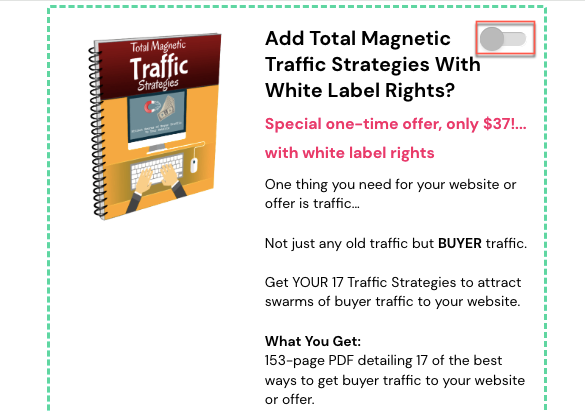
A bump offer (sometimes known as an order bump) is a simple sales technique for advertising another offer to the customer during checkout.
Now you might be wondering…
What’s the difference between a bump offer and an upsell?
A bump offer is a promotional offer that’s displayed on the actual checkout page with a small checkbox option for either a related product or service.
An upsell is usually an offer that compliments the original purchase and that is offered after you’ve made the first purchase.
Taking you to another sales page.
Look at this picture below.
You can see that this bump offer brought in $851.00 so far, not too bad for a first-time bump offer.
I haven’t been promoting this product for a little while as I’ve been working on another larger product…
once this is ready to be launched, I’ll probably increase the price from $37.
It covers 17 of the best ways to get buyer traffic to your website or offer.
This a simple 153-page pdf that took quite a lot of research, adding some of my own experience and time to put together.
But…
I can now use this to sell separately to package with other products and even as a bonus…
for affiliate products, etc.
It’s always good to keep in mind what other ways you can use the products you create.
Zaf.
P.S. If you’ve ever struggled with earning commission with affiliate marketing, then I HIGHLY recommend you take a look and secure your copy of Ben Fletcher’s…
Not only is it fantastic value overall but you’ll discover:
1) Ben’s SECRET 80% solution. (this one is for you if you’re a procrastinator)
2) The 4 Quads of Affiliate Traffic. (Once you understand this, be prepared to experience rapid growth!)
3) The one thing you must do with all your affiliate links to crank out more clicks & sales (this is another thing most affiliates miss or even worse, wilfully ignore)
The weather here in the UK today is extremely warm it’s 10:57 am and already it’s 17 degrees outside and it’s forecast to reach 21 degrees and in other parts of the UK may be even higher.
With the easing of lockdown on Monday just gone and the warm weather gives us plenty to look forward to.
Creating A Hook
A good habit to get into before even attempting to create a new product is first to think about the HOOK or title for your product.
A great hook can mean the difference between fantastic sales or mediocre sales to no sales at all.
You can use sites such as Amazon and Magazines.com and look at the non-fiction titles
Doing a search on Amazon for the word lose weight brings up titles:
Lose Weight For Good:Full-flavour Cooking For a Low-calorie Diet
Bike Your Butt Off!: A Breakthrough Plan to Lose Weight and Start Cycling (No Experience Necessary!)
The Water Fasting Guide: How To Restore Your Body, Heal Yourself, Feel Better and Lose Weight With Water Fasting
And searching self-help:
I’m Worth More: Realize Your Value. Unleash Your Potential
Good Vibes, Good Life: How Self-Love Is The Key To Unlocking Your Greatness
Coffee Self Talk: 5 Minutes a Day To Start Living Your Magical Life
If you live in the UK then you’ll find you won’t be able to access Magazines.com at least not without using a VPN.
But if do a search on google for Magazine and select images this will bring up tons of images of different magazine covers with some great headlines.
That you can use in both your sales copy, optin pages and hooks
And looking at just below the google search you can see a ton of different magazines you can click on from fashion to food 🙂
A great tip for this that will also help with productivity is a variation of the Pomodoro Technique.
Simple make notes of possible HOOKS using the above resources, while setting a google timer for 20-40 minutes then stop when done.
Doing one or two sessions like this will get some good ideas for hooks for your product or headline.
Best Regards
Zaf
If you’re looking for business ideas: Then I have a special offer just for you as a valued subscriber I’m offering you 65% discount on a product I purchased from a top UK marketer Tony Shepherd.
In this 40-page report you’ll learn:
10 Clever & Proven Micro-Models…
That you can replicate and adapt, these micro models aren’t just theories these are actual case studies that shows how the operator runs the model.
Just use the coupon code TENMIC at checkout for your 65% discount.
Many people are not aware that you can do a google reverse image search.
So, what is a google reverse image search?
Google reverse image search, lets you search on an image and find related images, your search may include:
Similar images
The website that contains these images
Other sizes of the image you searched with
What compatible browsers can you do this with?
You can do this on most browsers such as:
Chrome
Firefox
Safari
Now, this gets interesting when you doing research, for example, suppose you want to do some research on someone in your niche to see what sites, social profiles etc they have.
How to do the google images search
To do the search first open a tab in chrome or Firefox and click the icon for google images.
This will then display the below, you can then select what option you wish to do. We will use the option to drag and drop an image.
And then open another tab and head over to Amazon and do a search say on email marketing. Here the top search is for The 1-Page Marketing Plan.
From here we can then click on the title of the book to check the author
Click the author’s name, which we can see is Allan Dib, this brings up the author’s profile and his picture.
Next, we need to left-click on the image and keeping the mouse pressed drag it over to the google images tab.
Still keeping the left mouse pressed then drag the image down to the search option on google images search, then let go it may take a few seconds for google then to show the search results.
Looking at the results
Looking at the results I got you can see that this image appears in a few different locations including LinkedIn.
This can be quite valuable for research purposes…
Looking for images for your blog posts
Another use for google images is if we see an image on a blog post we like we can see where this image came from. The below image is from my own post. If I right-click the image and choose the option to open the image in another tab (using chrome for this example, I’ve used an image from my website).
After right-clicking and choosing the option to open the image in a new tab it will then bring the image up in a new tab.
The image will then open in another tab, as below. You then need to left-click the image again and drag (but don’t let go of the left click) to the google images tab at the top, then drag down onto the google images search option and let go, give it about a minute and it will do a search as I have below.
Scrolling down you can see the searches for “pages that include matching images.”
From the list, you can see the image I used for this blog post appears on quite a few sites and is one that I got from Pexels a free photograph.
I’m sure you’ve heard this saying countless times “Give the
customer what they want”.
Here is a great guide to help you in your business.
This is a great little trick I learned from another marketer Rob Cornish over at https://www.gainhigherground.com/blog that will help you in finding content to help build various products from creating a lead magnet to help build your email list, small product
This process involves you going to YouTube and then searching on your niche plus the words “how-to”, so for this example say our niche is Golf.
Going to YouTube and searching for “Golf how” and scroll through and select popular channels.
then click on the channel name, not the video, then from there select the video tab and click sort by most popular.
Doing this then gives us an overview of what people in this market are the most interested in. From the first video, you can see the most popular is “How I got my golf swing”then “How to hit your irons pure”, and “How I shape my irons”.
From this you can see what topics people are interested in,
this takes the need out of going to keyword tools as you can see by the views
what people are interested in.
Here’s another market we can try
Searching on “Law of Attraction how to” we find the below channels.
So, again we select the video tab and select sort by the most popular.
Here we see the most popular video here is “Sleep technique for attracting”, “Affirmations Meditation to attract love instantly”, and “Powerful morning routine for the law of attraction” are just a few here.
Another market we can look at is Yoga.
Picking one of the most popular Yoga channels.
From this, we can see the most popular video for this channel is Yoga for complete beginners: 20-minute Home Yoga.
Looking at this we can see that it’s got 25 Million views, from this we can see it’s for people who have an interest in learning Yoga but haven’t got a lot of time spare. From this, we could create a free report base around this, use as a blog post or even on a sales or opt-in page.
Finding out what people want
From this you’re becoming more precise on what people want, not having to guess.
And here’s more for you “martial arts how to”
Most popular on this channel is Punch Defence Tips – How to
defend punches more effectively, how to hit a heavy bag for beginners, how to
take a punch in a fight and even how to defend against a knife attack.
All you must do is check 2-3 hot channels in your market and
you can get some really good content for your lead magnet.
Looking at a big niche Copywriting you can really narrow down what people are looking for.
The most popular video here is “How to become a copywriter (with no experience)” as you can see some of these videos can give some great headline ideas.
Now I hope you can see it doesn’t need to take days to find
the info theirs is any perfect way of doing this but with more knowledge and little
tools like this it can really make things easier for you.
The year was 1984 and Boris Weisfeiler decided to book a trip to Chile to escape the cold wintery weather he booked his trip to hiking several trails in the Andes mountains. It’s thought that Boris tried to cross during his hiking trip.
And that was the last seen of him, the only sign he’d been nearby the river was his backpack that was found on the riverbank along with his footprints going northward toward a bridge near Colonia. Boris never returned home or was ever seen again.
The local authorities in chile assumed that he had drowned
while trying to cross over the river, his body was never recovered. The
strangest thing is that 16 years later after his disappearance declassified US documents
revealed that Boris who was in fact a State University professor may have been murdered
in Chile.
These documents allege that a witness saw Boris being interrogated
at an agricultural commune before being shot.
On August the 21 2012, a Chile Judge ordered the arrest of
eight retired police and military officers in connection with the alleged kidnapping
and disappearance of Boris Weisfeiler. According to the court findings the
suspects were to have been prosecuted for “aggravated kidnapping” and “complicity”
in the disappearance of a US citizen.
The case was close in 2016 after the judge ruled to be a common crime…
Finding Ideas for Your Reports
At times marketing can feel a bizarre and an overwhelming mystery. Such has trying to write a free report or eBook and knowing what the hell to put into your report.
If you’re looking for an idea on what to include your free report on or just for some ideas on content for your blog post, then I’ve got some great tips for you on how you can find ideas for your content that is free and easy to do.
Start by asking the question, “What do people actually want?”
If the answer to this question leaves you a bit stumped or you really don’t have a clear idea what the people in your niche want. Then start first with a simple search on google for the name of your niche plus the word “forum”. By going through the most popular threads you can great little gems of info for your eBook or free report.
Learn from your competitors by spying on them, searching on
google for the name of your niche plus “free report” or “eBook”, and even sign
up to their mailing list to get their free report and study it.
Remember your aim is to find inspiration not to copy them,
see what the common theme is in your niche.
Put a search term in the box and
hit get questions and you’ll be presented with results for loads of questions
people are asking in that particular niche.
In the below example I used the search term Law of Attraction and got the results below, this is only a shortlist of what is returned the actual page returned more than these and has you can see there are plenty of ideas you can get from these questions.
2. Full page screen capture (chrome extension)
This is a chrome extension that takes a full webpage screenshot very handy if you have a sales page that is usually very long – using this tool you can grab a screenshot of the whole page. Just by clicking the icon in your browser.
Which then gives you this hand option to save either as a pdf. Or as a png file, by clicking the download option as below.
Which brings up the below box.
This is a very handy tool to help you build your swipe file of not just only sales pages but opt-in pages or any website you like the look of.
To get this tool you can either click the link at the beginning of this section or you can enter full page screen capture into a google search.
Once you click the link you are then taken to this page.
Remember though this is for chrome, once installed it creates a camera icon in your chrome browser. If you’re using Firefox then there is a similar one called Page Screenshot, although I haven’t used this one.
3. Amazon.com
Amazon.com is great to get ideas for products and headlines ideas by checking the top-selling books and magazines. If you look through the chapters of the bestselling books you can get some great ideas for both content and product creation.
For example, by doing a quick search on Amazon.com for dog training books and you can see the results below, you get some good ideas on what headlines are being used in your niche.
Looking on Amazon I found this book…
101 Dog Tricks: Step by Step Activities to Engage, Challenge, and Bond with Your Dog which has 1,327 ratings, this headline uses the classic 101 ways headline. Clicking on the look inside option and going to the contents or chapters can give you an excellent idea of what to include in your content, what people are looking for. So instead of trying to rack your brain for ideas you can go to Amazon and get some great ideas there!
Another place to check is the Amazon reviews for bestselling books more particular for reviews 3 and below, you can find some great info here of what’s lacking in the product which can give you a better idea of what to include in yours.
I hope you’ve found value from this post, please let me know your thoughts or what great tools you use to help find and create content.