Author: Zafer Barnes

  • How To Set Up 2-Factor Authentication

    A great tool I’ve been using now for a few years is Wordfence, I’ve just been using the free version and with the odd minor problems, it’s been very reliable.

    If you are not already you should be using some sort of security software for your website fortunately if you’re using WordPress for your website, there are lots of options to choose from both FREE and paid for.

    Wordfence has several features built-in with its built-in firewall you can keep a check on login attempts… which can be both surprising and a bit alarming!

    But at least you know Wordfence is doing its job…

    This neat little tool even has the option to track the IP of the failed login attempts, using one of the tools in Wordfence called WHO Is which will also give you the option to “Block This Network”.

    With a built-in malware scanner and notifications, you get via email when there’s a problem, such as a plugin that’s out-of-date.

    Another cool feature is under the login security with various options the main one being two-factor authentication (which provides an extra layer of security).
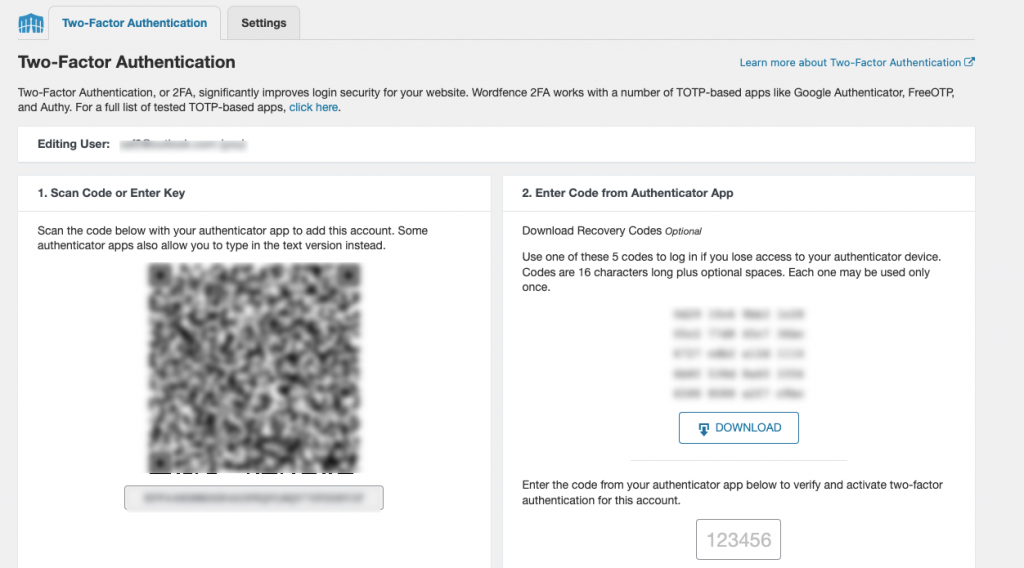
    To use this, you’ll need a mobile authentication app such as Microsoft Authenticator or Google’s Authenticator.

    Just install the app on your mobile device and add an account on the Microsoft Authenticator app click the plus and select “Personal account”.

    You’ll then get an option to “Scan QR code”, selecting this then brings up the option to scan the QR code.

    And if you’re using the Google Authenticator app, click the plus and select “Scan a QR Code”.

    Once you’ve added the code the app gives you into the required box an option to download the recovery codes will pop up…make sure to store somewhere save so that you’ll remember the location.

    Once this is set up the next time you log in, you’ll then be presented with a box for the authentication code that you’ll need to get from the app.

    Although this is providing extra security you want to also make sure you do regular backups on of the advantages of using Siteground is that backups are done automatically on a daily basis.

    Let me know your thoughts good or bad 🙂

  • The Graphics Creator Review

    A great tool i’ve now been using for a number of years is the Graphics Creator, recently i purchased the lifetime access for a low price, the software is sold by Laughingbird software owned by Marc & Lisa Sylvester they’ve recently partnered with a company called App Sumo.

    For a very limited time you can buy The online version of The Graphics Creator (lifetime access)

    You’ll have Instant access to

    • ad creation templates (just drop in your own text and get your visitors to click)
    • text effects (stand-out visual headlines to go with your perfectly crafted headline copy))
    • blog graphics templates (update your graphics as well as your blog articles)
    • social media templates (call out to your Facebook & Instagram visitors)
    • buttons, banners, and badges (visitors will click on these to buy!)
    • e book cover and mockup templates (create your own attention-grabbing book covers and product design)

    You can build your own character mascot… and a TON more!

    Over 1200 templates to modify – and 5,000 built in elements at your fingertips!

    For more information click here…

    P.S. I hope you found the video useful, I would love to hear your thoughts below 🙂

  • Quick Beginner’s Guide to Internet Marketing

    I found this great video on for beginners on internet marketing and i thought i’d share it here.

    https://youtu.be/0fthVnDVP7o

    This video explains how to discover the size of your audience niche and how to find an offer to promote, in the video Fullstaq Mentor, explains how you can set up an advert targeting your audience directly to the offer, which you can do and even tried in the past.

    But, there’s one small problem with this…you have only ONE shot at making any money doing this and because you haven’t got the person’s email address doing this you’ve lost a great chance in both building a relationship with that person and sending more offers.

    The better way would be to build an email list and then send affiliate offers through email. I hope you’ve found this information useful, i’d love to know your thoughts below 🙂

    P.S. If you want to learn some strategies that could help you with your affiliate marketing then why not take a look at Secrets Of A Retired Affiliate

    Whether you’re just starting out online, maybe you’ve got a business and want to add some extra revenue or you’re a complete newbie.

    One of the simplest ways to get started that doesn’t require you to have a product, any experience and heck even a reputation is affiliate marketing.

    Take a look at Secrets of A Retired Super-Affiliate for the top super-affiliate strategies never shared before that bought $3000 – $10,000 a month in commissions.

  • Two Great Tools I Use With My Facebook Ads

    If you’ve ever run a Facebook ad you’ll know that in order to track your conversion weather that’s a sale or optin or something else you need to use what Facebook call a pixel, a little bit of code that is placed on your sites pages.

    This is so Facebook can track any conversions that happen on these pages. And also optimizes your ads.

    But without this pixel being on your site Facebook wouldn’t be able to show your conversions or optimise you’re ads.

    For example, say you were running a Facebook ad to an optin page, you got 100 visits to your opt-in page and 20 of those visits opted in.

    if you haven’t got your Facebook pixel installed you wouldn’t be able to see this conversion in your dashboard.

    And this is exactly the mistake I made when I created my new opt-in page for my new lead magnet The Killer Leverage Strategy.

    My Current Test Campagin

    Below you can see a test campaign I’m currently running that shows the conversion of 22 leads and the amount I’m spending per day.

    I’ve forgot to install the pixel on my thank you page so all the leads I got wasn’t all recorded in Facebook. I’ve actually got 25 leads at present from this campaign.

    • The main job of the pixel is to track conversions

    When a visitor lands on your Thank You Page the pixel “fires” letting Facebook know to record that conversion in your stats. And it optimizes your ads by showing your ad to people with similar interest to the people who opted into you lead magnet.

    This is the Facebook Ad I’m currently testing

    What you need to ask yourself before you even create your Facebook ad is, is my offer desirable enough? will people be willing to give me their email address for this?

    The amount of success you have depends on the offer you have.

    Installing The Tool

    The easiest way to install this on your site especially if your using WordPress is to use WordPress addon called Pixel Your Site.

    This addon makes it so easy to install your Facebook pixel.

    To install just go to your WordPress dashboard plugins then add plugin and type Pixel in the search box

    You’ll then see the addon Pixel Your Site click on this and install.

    Once you’ve installed this, you’ll then need to get your Facebook pixel for this if you haven’t already you need to create a Facebook Ads manager account.

    You can just type Facebook Ads Manager into google and then either login or open a new Facebook Ads account.

    Once logged into your Facebook Ads Manager you then go to the Events option

    Then on the left-hand side, you’ll have a blue button labelled “Continue Pixel Setup”.

    Set up your pixel once you have the pixel code go back over to your WordPress dashboard to Pixel Your Site and then click on “Settings” and copy the pixel from Facebook and paste it in then scroll to the bottom and click “save”.

    Setting Up And Testing An Event

    The next step we now need to do is setup an event in Pixel Your Site click on “Events” then choose the option to add give the new event a title name of lead magnet etc.

    Make sure that “Fire event when” is set to “Page visit”.

    (normally this is by default)

    You should see “URL Contains” selected and next to this an option to put in the URL to your Thank You Page.

    When done go down to the bottom and click save.

    Now we need to check the event is triggered when the Thank You Page is visited. For this we can install a Chrome addon called Facebook Pixel Helper.

    You can install this from the Chrome store here

    Once installed you should see an icon at top of the browser that looks like </>.

    Goto your Thank You Page and you now see when you click the </> an option for Lead as below.

    Congratulations your pixel is now installed successfully.

    I love to hear to hear your feedback, so please drop a comment below cheers Zaf 🙂

  • Creating a great hook for your product or copy

    The weather here in the UK today is extremely warm it’s 10:57 am and already it’s 17 degrees outside and it’s forecast to reach 21 degrees and in other parts of the UK may be even higher.

    With the easing of lockdown on Monday just gone and the warm weather gives us plenty to look forward to.

    Creating A Hook

    A good habit to get into before even attempting to create a new product is first to think about the HOOK or title for your product. 

    Hook

    A great hook can mean the difference between fantastic sales or mediocre sales to no sales at all.

    You can use sites such as Amazon and Magazines.com and look at the non-fiction titles

    Doing a search on Amazon for the word lose weight brings up titles:


    • Lose Weight For Good: Full-flavour Cooking For a Low-calorie Diet
    • Bike Your Butt Off!: A Breakthrough Plan to Lose Weight and Start Cycling (No Experience Necessary!)
    • The Water Fasting Guide: How To Restore Your Body, Heal Yourself, Feel Better and Lose Weight With Water Fasting

    And searching self-help:

    • I’m Worth More:  Realize Your Value. Unleash Your Potential
    • Good Vibes, Good Life: How Self-Love Is The Key To Unlocking Your Greatness
    • Coffee Self Talk: 5 Minutes a Day To Start Living Your Magical Life

    If you live in the UK then you’ll find you won’t be able to access Magazines.com at least not without using a VPN.

    But if do a search on google for Magazine and select images this will bring up tons of images of different magazine covers with some great headlines.

    That you can use in both your sales copy, optin pages and hooks

    And looking at just below the google search you can see a ton of different magazines you can click on from fashion to food 🙂

    A great tip for this that will also help with productivity is a variation of the Pomodoro Technique.

    Simple make notes of possible HOOKS using the above resources, while setting a google timer for 20-40 minutes then stop when done.

    Doing one or two sessions like this will get some good ideas for hooks for your product or headline.

    Best Regards

    Zaf

    If you’re looking for business ideas:
    Then I have a special offer just for you as a valued subscriber I’m offering you 65% discount on a product I purchased from a top UK marketer Tony Shepherd.

    In this 40-page report you’ll learn:

    10 Clever & Proven Micro-Models…

    That you can replicate and adapt, these micro models aren’t just theories these are actual case studies that shows how the operator runs the model.

    Just use the coupon code TENMIC at checkout for your 65% discount.

    Go Here for full details

    You also get three week’s support from me to ask questions, run ideas by me and basically get my input on anything you need.

  • How To Create An Optin & Thank You Page: Under 5 Minutes

    The ways you can do this are:

    Building an email list should be one of your main priorities as this is one of your main assets for your business.

    1. Give something a way for free

      Such as a free report that requires an email

    2. Offer a product or service

      Then when person buys your product or service that get added to your email list for future follow ups.

    Below you’ll find a video that walks you through how to setup an email optin & thank you page, in under 5 minutes!

    To watch the video.

    Click Play Below.

    You’ll find links to resources below:

    Links:

    • 17 Rapid Side Hustles (17 Quick Ways to Help You Make Some Extra Cash)
    • Aweber (a great email system to start with and free up to 500 subscribers)

    Now you may be wondering that’s great and all…but what can I give as a free optin?

    These days is no longer advised to create 50-60 page pdf or even a 60 minute video, as peoples attention span have significantly reduced.

    Instead, think about creating a simple 1-page pdf, swipe file, quick tips guide etc.

    Please leave your comments below, i’d love to know your thoughts 🙂

  • Fancy A Free Course or 2?

    Happy Easter!

    This week we’re in the 3rd week of lockdown here in the UK, Today’s 12th April 2020 Easter Sunday.

    And this weekend’s been lovely, I’ve got the back garden mowed and if weather’s fine tomorrow will be doing the front garden.

    The past couple of weeks has been a bit hectic, I finished a contract job and so have had to find another one.

    Fortunately, I’ve managed to get a new job just as the lockdown was occurring here in the UK.

    Currently I’m working from home, as I work in IT, I’m fortunate I can work from home during these uncertain times. Although I must admit it’s getting a bit boring now, but it’s better to stay at home and be safe.

    I came across two excellent courses that are being offered for free while the world is on lock down and I thought I’d share these here with you, I’ve gone through one and am currently going through the other they’re both give excellent training.

    The first one is by Mark Ling called The 3 Hour Affiliate This is a great course that shows you how to setup an affiliate website and hopefully to start making money from it.

    The next free course is by Rob Cornish Build A Profitable Online Business

    I’ve followed Rob for many years and bought some excellent courses from him. He provides excellent content in his courses and this one is no exception, he even gives a Facebook group to sign up to which you can get help or answers to questions you may have.

    I hope you find these of help during the uncertain times we all find ourselves in. Stay safe 😊

    P.S. Feel free to leave your comments below if you have any questions feel free to also email me at zaf@fiftyplusmarketer.com

  • How to use googles reverse image search

    How to use googles reverse image search

    Many people are not aware that you can do a google reverse image search.

    So, what is a google reverse image search?

    Google reverse image search, lets you search on an image and find related images, your search may include:

    • Similar images
    • The website that contains these images
    • Other sizes of the image you searched with

    What compatible browsers can you do this with?

    You can do this on most browsers such as:

    • Chrome
    • Firefox
    • Safari

    Now, this gets interesting when you doing research, for example, suppose you want to do some research on someone in your niche to see what sites, social profiles etc they have.

    How to do the google images search

    To do the search first open a tab in chrome or Firefox and click the icon for google images.

    Goolge

    This will then display the below, you can then select what option you wish to do. We will use the option to drag and drop an image.

    Google image search

    And then open another tab and head over to Amazon and do a search say on email marketing. Here the top search is for The 1-Page Marketing Plan.

    Searching on Amazon to find an expert in your niche

    From here we can then click on the title of the book to check the author

    searching for author's name on Amazon

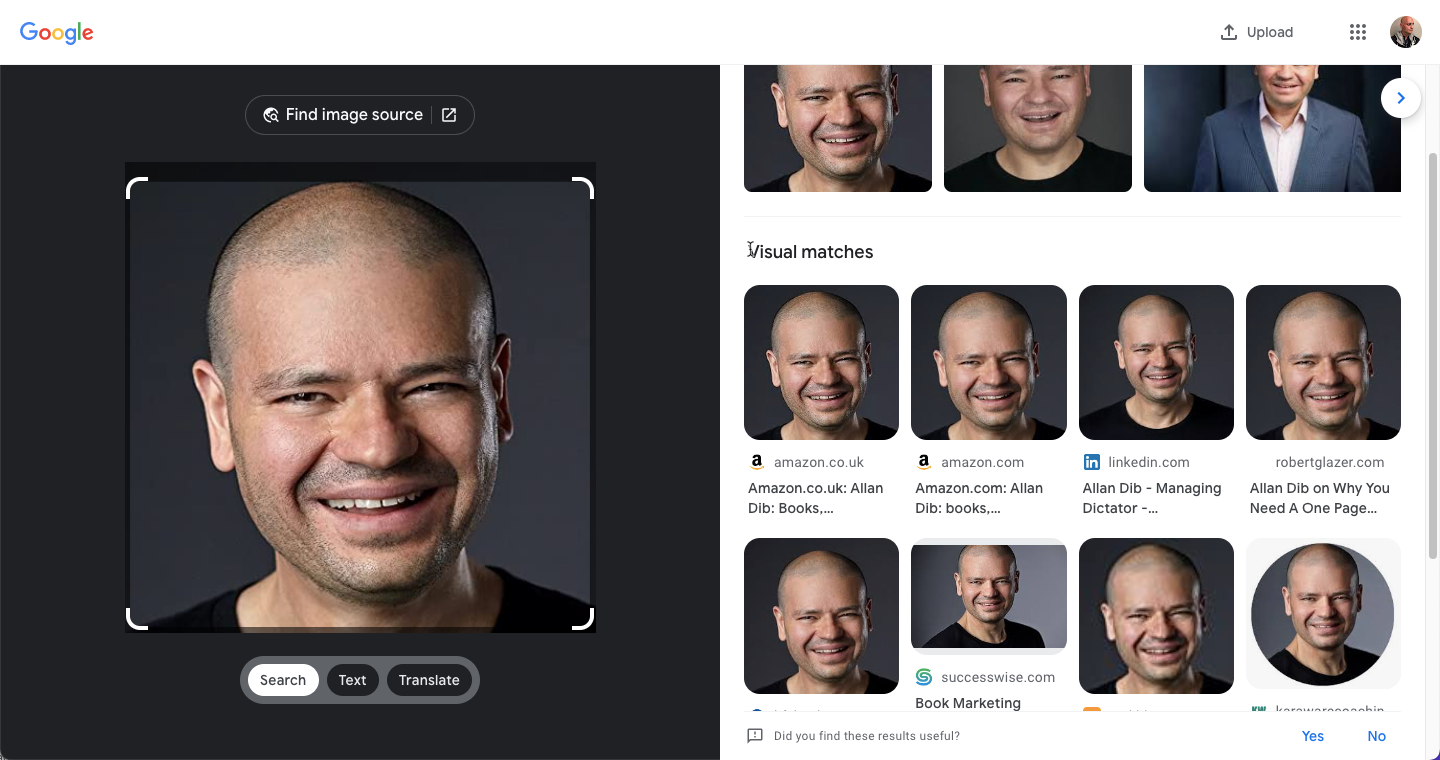
    Click the author’s name, which we can see is Allan Dib, this brings up the author’s profile and his picture.

    drag and drop image of author into google images

    Next, we need to left-click on the image and keeping the mouse pressed drag it over to the google images tab.

    drag and drop image of author into google images tab

    Still keeping the left mouse pressed then drag the image down to the search option on google images search, then let go it may take a few seconds for google then to show the search results.

    Google  Image search with Lens

    Looking at the results

    Looking at the results I got you can see that this image appears in a few different locations including LinkedIn.

    Google Image search results

    This can be quite valuable for research purposes…

    Looking for images for your blog posts

    Another use for google images is if we see an image on a blog post we like we can see where this image came from. The below image is from my own post. If I right-click the image and choose the option to open the image in another tab (using chrome for this example, I’ve used an image from my website).

    Another example looking for images for your blog posts

    After right-clicking and choosing the option to open the image in a new tab it will then bring the image up in a new tab.

    open the image in a new tab

    The image will then open in another tab, as below. You then need to left-click the image again and drag (but don’t let go of the left click) to the google images tab at the top, then drag down onto the google images search option and let go, give it about a minute and it will do a search as I have below.

    Scrolling down you can see the searches for “pages that include matching images.”

    From the list, you can see the image I used for this blog post appears on quite a few sites and is one that I got from Pexels a free photograph.

    I hope you found this article helpful…

    Please feel free to leave your comments below: 😊

  • What’s your peg?

    What’s your peg?

    Ever wonder why a circus elephant doesn’t run away?

    Elephants are big powerful creatures that could quite easily snap the flimsy wooden pegs from the ground they’re chained to, yet they don’t even attempt to. They can escape to freedom anytime they want to. But these powerful creatures that can way as much as 6,000kg stay chained.

    What’s going off in the elephant’s mind to prevent them from even trying?

    Elephant

    Well, what happens to the elephants when they’re babies is that they are chained to a metal stake hammered into the ground, the chain going around the elephant’s leg. The chain and peg are strong enough to prevent the baby elephant escaping.

    The baby elephant would attempt to escape many times and when it did the metal chain would tighten around the baby elephants leg causing deep cuts in the poor baby elephant’s leg, making its leg bleed causing the elephant’s leg to hurt more.

    After numerous accounts of this happening the baby elephant would then realize it couldn’t escape and so would stop trying.

    Years later when the elephant was fully grown it still would be tied to that peg but

    With such animal cruelty, its no wonder circuses were banned…

    What’s holding you back?

    Like the elephant we to have our pegs, something that’s holding us back, maybe you’ve been told you’ll never amount to anything, or perhaps you’ve been bullied. Over time you may have accepted that thought or believed it to be true.

    Ask yourself “am I tied down to a wooden peg, that I can easily break free from?”

    How does relate to internet marketing?

    To be a successful internet marketer you’ve got to be able to sell…

    Most people freak out when they hear the word selling. But think about this, when you’ve brought something that you think fantastic that you absolutely love what do you do.

    iPhone

    For example, if you just got a new iPhone and you show off all the things you love about it the fantastic camera, how great the pictures are it takes, and how it looks. What do you think you’re doing when you do this?

    That’s right your selling all the benefits and features that your new iPhone has, so you see it’s easy to sell something if you really believe in what you’re selling.

  • A board game you wouldn’t want to play

    A board game you wouldn’t want to play

    In many household’s board games a traditional event around Christmas or at least they used to be.

    I remember playing scrabble and really enjoyed the game, although I can’t really remember the last time I actually played a board game.

    Scrabble

    But have you ever heard of the board game Game of Death? This board game dates to the time of Tutankhamun and was played both by queen Nefertari and Tutankhamun and who was buried with five-game boxes.

    I guess even way back then they were into gaming…

    And do you know why it was called the game of death?

    Playing against the dead

    Would you want to play against the dead?

    I know wouldn’t, in ancient Egypt they believed that the souls of the dead had to win games against the living for them to pass onto their equivalent of Nirvana. Don’t know about you, but I won’t be playing this board game anytime soon…

    Senet was thought to be a representation of the journey of the ka (the vital spark) to the afterlife. Senet was not only played by the Egyptians but also local people in neighbouring cultures and is thought to have been brought there through trade relationships between the Egyptians and local peoples.

    Pyramids

    As the locals made games out of stone, this led to more senet games being found in Cyprus than in Egypt.

    The Gameplay

    The senet gameboard consists of a grid of 30 squares, arranged in 3 rows of ten, a senet board has two sets of pawns or pieces 5 of each. The pawns are arranged alternating between one another and move across the board in an “s’” shaped pattern.

    The player to remove all their pawns off the board first wins the game. You can only get a pawn off the board by moving the exact amount of spaces necessary.

    Players move across the board by using throw-sticks arranged in three rows.

    These rules are from the egyptianmuseum.org website.

    The original game rules are not really known and are subject to much conjecture, as the rules have been pieced together from bits of text covering a thousand years. The game is thought to be like Backgammon.

    Backgammon

    Found in a California Museum

    An archaeologist at Maastricht University writes about the board game in The Journal of Egyptian Archaeology.

    The game was discovered in the San Jose Rosicrucian Egyptian Museum in California of all places!

    Talk about overlooking the obvious lol, the game hadn’t even been catalogued and is now thought to be one of the first examples and is mentioned in the Book of the Dead chapter 17 where the deceased plays senet.

    Feel free to leave your comments below 😊